
Help
School
Periods
Periods are blocks of time around which your school schedules classes. Without at least one active period, you will not be able to create classes.
Periods are primarily organizational, but they also affect:
- Class rollovers from one session to the next
- Reporting and data segmentation
- Administrative tracking across academic cycles
The length of a period is entirely up to your school. It may represent:
- A full academic year
- A semester
- A term
- A quarter
- A summer session
Choose a structure that reflects how your school operates.
How to Create a Period
- Navigate to School > Details from the sidebar
- Select the Periods tab
- Click Add Period
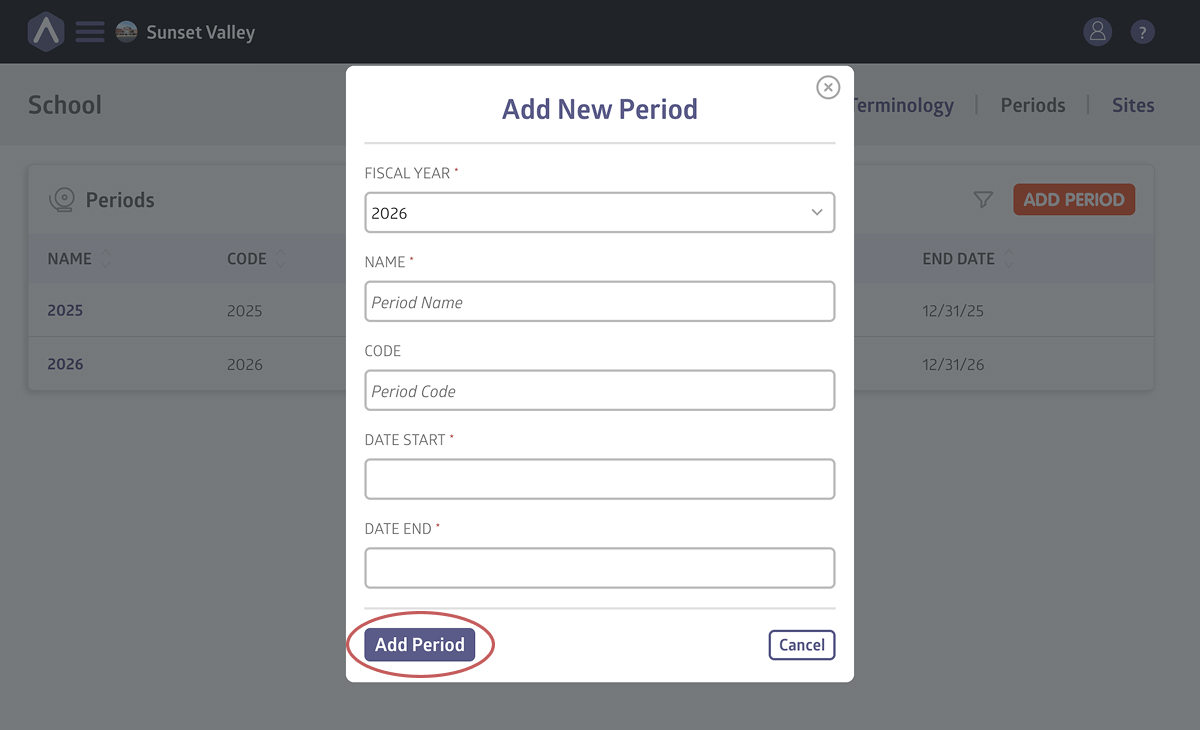
- Select the appropriate Fiscal Year
- Name the Period
- Enter a Period Code (short identifier)
- Choose the Start Date and End Date
- Click Add Period
Once created, the period will be available when building classes.
Best Practices When Creating Periods
To keep your system clean and easy to manage:
- Create periods before building classes
- Use consistent naming conventions (e.g., 2026-Fall, 2026-Spring)
- Avoid overlapping periods unless your structure requires it
- Confirm dates before creating active classes
Well-defined periods make reporting and future rollovers significantly easier.
What Happens After You Create a Period?
Once a period exists, you can:
- Create classes within that time block
- Assign enrollment to that period
- Run reports filtered by period
Periods form the foundation of your academic structure.
Still stuck? Shoot us an email and we’ll do our best to help.