
Help
Classes
Creating and Managing Lessons
A Lesson groups related learning into a unit, week, or topic within a class. Lessons help organize activities and guide students through the curriculum in a clear, structured way.
Lessons live inside classes and contain one or more activities.
Creating a Lesson
To create a new lesson:
- Open the side navigation and click Classes
- Select the class you want to add the lesson to
- Click Lessons in the top navigation
- Click Add Lesson, then New Lesson
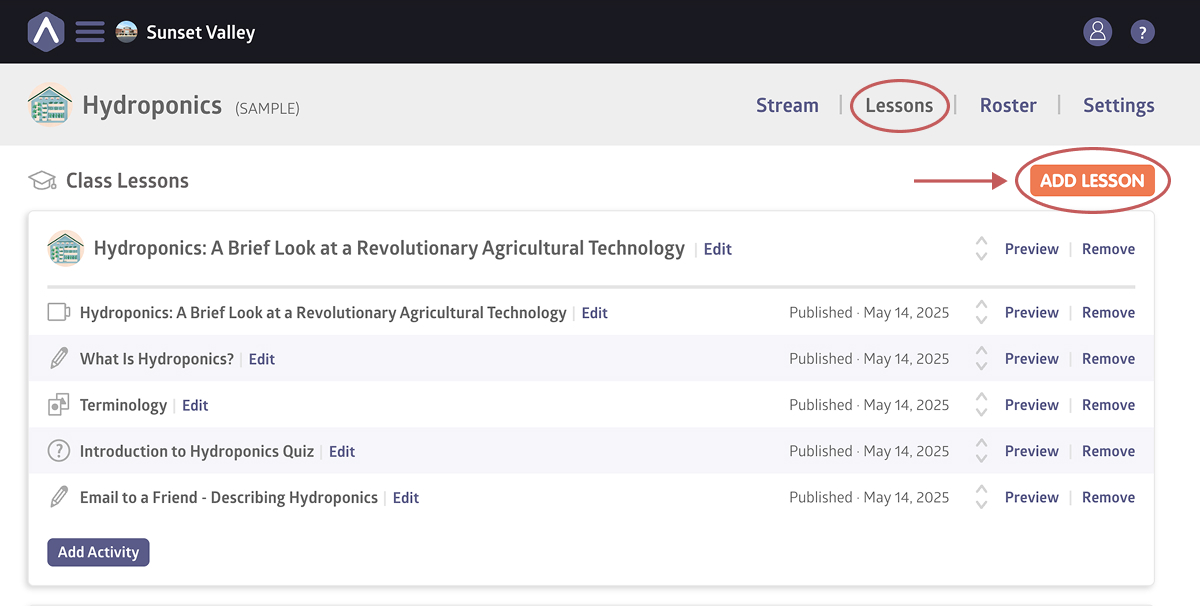
- Enter a title and, optionally, add a description and cover image
- Click Add Lesson
After creating a lesson, you can begin adding activities.
Copying a Lesson to a Class
If you’ve already created lessons in another class, you can copy them into a new class instead of starting from scratch.
To copy an existing lesson:
- Open the side navigation and click Classes
- Select the class you want to copy lessons into
- Click Lessons in the top navigation
- Click Add Lesson
- Select one or more existing lessons
- Click Copy Lesson to Class
Copied lessons can be edited independently after they’re added to the class.
Still stuck? Shoot us an email and we’ll do our best to help.